<?xml version="1.0" encoding="utf-8"?><feed xmlns="http://www.w3.org/2005/Atom" ><generator uri="https://jekyllrb.com/" version="3.10.0">Jekyll</generator><link href="https://blog.berni.kr/feed.xml" rel="self" type="application/atom+xml" /><link href="https://blog.berni.kr/" rel="alternate" type="text/html" /><updated>2026-03-05T12:40:47+00:00</updated><id>https://blog.berni.kr/feed.xml</id><title type="html">blog.berni.kr</title><subtitle>A small blog with random stuff I do</subtitle><author><name>Bernadette Kralofsky</name></author><entry><title type="html">The L64 Coordinate System</title><link href="https://blog.berni.kr/b/L64" rel="alternate" type="text/html" title="The L64 Coordinate System" /><published>2016-11-20T00:00:00+00:00</published><updated>2016-11-20T00:00:00+00:00</updated><id>https://blog.berni.kr/b/L64</id><content type="html" xml:base="https://blog.berni.kr/b/L64"><![CDATA[<p>One day browsing the internet I stumbled upon <a href="http://what3words.com/">what3words</a>, a website promising to simplify the way we use coordinates.
Instead of using two numbers for latitude and longitude they use 3 words.
They do this by using a grid of 57 trillion 3x3m squares and an proprietary algorithm to map every square to a unique 3 word address.</p>

<p>As much as I like the vision of making coordinates easier to handle, I have a few issues with it:</p>

<ol>
  <li>Their convert algorithm is proprietary</li>
  <li>It has a fixed resolution of 3 meters</li>
  <li>In order to convert coordinates you need an arbitrary wordlist of at least 40 000 words</li>
  <li>They <a href="https://www.google.com/patents/WO2014170646A1?cl=en">patented</a> the idea of converting coordinates into words</li>
</ol>

<p>So I decided to invent my own coordinate system that simplifies coordinates into a single string.
However, instead of using 3 random words I wanted my system to be logical and also easy to implement.
Also I wanted a system where your coordinates could be as accurate as you want.
A system like decimal numbers came to my mind, where adding a digit at the end improves the accuracy of the number.<sup id="fnref:olc" role="doc-noteref"><a href="#fn:olc" class="footnote" rel="footnote">1</a></sup></p>

<p>As I want my coordinates to be a string that is easy to handle nevertheless compact in information I decided to use <a href="https://en.wikipedia.org/wiki/Base64">Base64</a>. (Actually base64url for easier handling.)
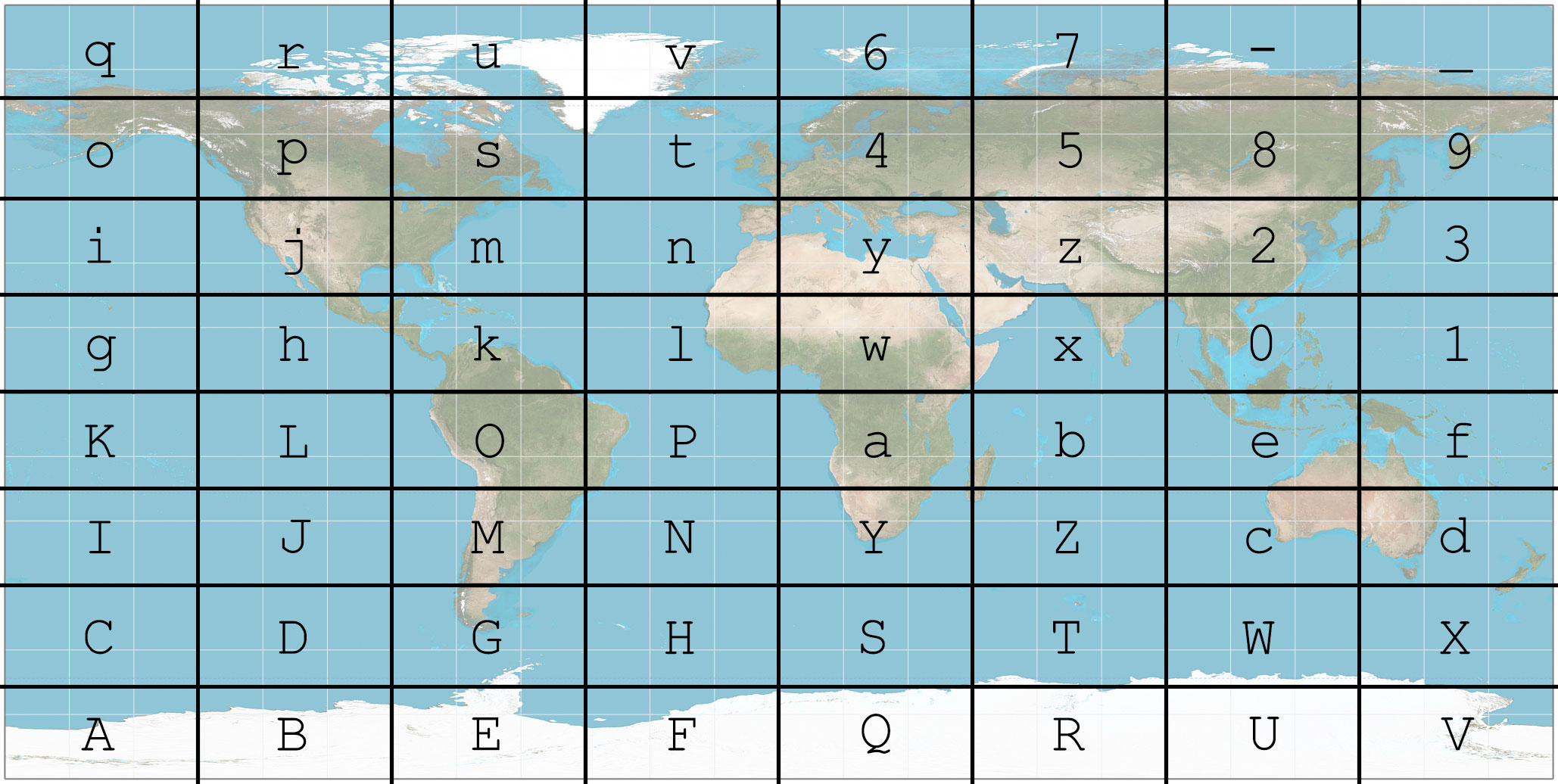
In order to use a Base64 string as a location I use an 8x8 grid on top of a map in equirectangular projection (because it is the easiest projection to use with latitude/longitude coordinates).
Every cell in the grid corresponds to a single Base64 character.</p>

<figure class="">
  <img src="/assets/L64/map.jpg" alt="" />
  
    <figcaption>The L64 grid on a world map. (Source for the map: <a href="https://commons.wikimedia.org/wiki/File:Equirectangular_projection_SW.jpg">Wikimedia</a>)
</figcaption>
  
</figure>

<p>This is the first letter of the L64 coordinate.
With a single letter you can give a very broad location.
It might not be useful for the most things, but the first letter can distinguish between East Coast (<code class="language-plaintext highlighter-rouge">m</code>) and West Coast (<code class="language-plaintext highlighter-rouge">j</code>) or Mediterranean regions (<code class="language-plaintext highlighter-rouge">y</code>) and northern Europe (<code class="language-plaintext highlighter-rouge">4</code>).</p>

<p>In order to get more accuracy we scale the grid down by a factor of 8 and put it in one of the cells of the first level grid.
This second level grid tells us the second letter of the L64 coordinate.</p>

<p>If we repeat this scaling and inserting of the grid we can construct a L64 coordinate with as much precision as we need.
However only 8 characters are needed to get an accuracy of about 2m.
With only 2 characters more the accuracy in the order of centimetres.</p>

<p>You see that this system is relatively simple.
Implementing it is even easier, because of the used order of the letters.
There are actually two different convert algorithms:</p>

<h2 id="converting-via-quadkeys">Converting via quadkeys</h2>

<p>This is the algorithm I implemented first.
It uses <a href="https://msdn.microsoft.com/en-us/library/bb259689.aspx">quadkeys</a> to convert a location.
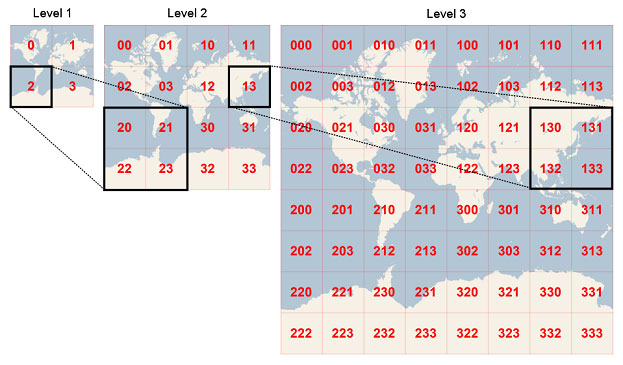
Quadkeys are a base 4 number that corresponds to a square on the map.
They work by dividing the map into four quarters, numbering them from 0 to 3.
The dividing is repeated until the level of detail required.</p>

<figure class="">
  <img src="/assets/L64/quadkey.jpg" alt="" />
  
    <figcaption>How quadkeys work. (Source: <a href="https://msdn.microsoft.com/en-us/library/bb259689.aspx">MSDN</a>)
</figcaption>
  
</figure>

<p>It is important to note that the <em>Bing Maps quadkey</em> uses the <em>Mercator projection</em>, whereas L64 uses the <em>equirectangular projection</em>.
The specific projection used in L64 also has the (0, 0) coordinate at the bottom left, instead of the top left.</p>

<p>Therefore the used numbering of the quadkeys is \(\begin{matrix} 2&amp;3 \\ 0&amp;1 \end{matrix}\) instead of \(\begin{matrix} 0&amp;1 \\ 2&amp;3 \end{matrix}\).</p>

<p>The L64 convert algorithm functions the following way:</p>

<ol>
  <li>Convert the coordinates into a quadkey with as much accuracy as you want. <strong>Mind the projection!</strong></li>
  <li>Trim the quadkey to a length of \(3x\), where \(x\) is the wished length of the L64 coordinate.</li>
  <li>Convert the base 4 quadkey to Base64 using basic math. The beauty of this is the fact that \(4^3=64\) which means that 3 characters in a quadkey correspond to a single base 64 character.</li>
</ol>

<p>That’s it. This is all the conversion algorithm.
Converting a L64 coordinate back is as easy as reversing the upper algorithm.
The only thing to note is that a quadkey resolves to an area and not a single point.
Therefore you might have to calculate the centre of the quadkey square.</p>

<h2 id="converting-via-binary-fractions">Converting via binary fractions</h2>

<p>After thinking about my implemented algorithm a bit I realized it could be simplified.
If you look at a quadkey (or a L64 coordinate, as they are the same thing in different bases) in binary it has an interesting property.
The first digit indicates if you are in the northern or southern hemisphere.
The second digit reveals if you are east or west of greenwich.
The third digit specifies the north-south position established in the first digit further.
And so on and so forth.</p>

<p>So this is the simplified algorithm after that realization:</p>

<ol>
  <li>Project the latitude and longitude to numbers between 0 and 1 according to the right projection.</li>
  <li>Convert the numbers to binary fractions</li>
  <li>Drop the <code class="language-plaintext highlighter-rouge">0.</code> at the beginning</li>
  <li>Interlink those numbers by alternating their digits starting with the latitude so that <code class="language-plaintext highlighter-rouge">abc</code> and <code class="language-plaintext highlighter-rouge">xyz</code> would become <code class="language-plaintext highlighter-rouge">axbycz</code>.</li>
  <li>Trim the result to a length of \(6x\), where \(x\) is the desired length of the L64 coordinate.</li>
  <li>Convert the resulting binary number to Base64. While doing that 6 binary digits correspond to a single Base64 char. (\(2^6=64\))</li>
</ol>

<p>The reverse is also as simple as doing every step backwards.</p>

<p>While this algorithm has more steps than the previous one it is still simpler.
This is so because most of the complexity of the first algorithm is hidden inside the first step: Calculating the quadkey</p>

<p>With the second algorithm it is as easy as looking at a binary representation of the coordinates and combining them by alternating.</p>

<p>This makes L64 coordinates especially useful on machines with limited power like a microprocessor that is connected to a GPS module. L64 could for example be used to transmit coordinates from a GPS tracker via GSM or an other type of radio with limited bandwidth. And if human readability is not required L64 coordinates can be sent directly as binary, allowing them to be as compact as coordinates can ever be.</p>

<p>You can play with an implementation of L64 with the Google Maps API <a href="https://bernikr.github.io/L64/">here</a>.</p>

<div class="footnotes" role="doc-endnotes">
  <ol>
    <li id="fn:olc" role="doc-endnote">
      <p>I later learned of <a href="https://en.wikipedia.org/wiki/Open_Location_Code">Open Location Code</a>’s <em>plus codes</em> which are probably easier to use for end-users and better thought out than my system. However L64 has a higher information density and a simpler convert algorithm. <a href="#fnref:olc" class="reversefootnote" role="doc-backlink">&#8617;</a></p>
    </li>
  </ol>
</div>]]></content><author><name>Bernadette Kralofsky</name></author><summary type="html"><![CDATA[One day browsing the internet I stumbled upon what3words, a website promising to simplify the way we use coordinates. Instead of using two numbers for latitude and longitude they use 3 words. They do this by using a grid of 57 trillion 3x3m squares and an proprietary algorithm to map every square to a unique 3 word address.]]></summary></entry><entry><title type="html">Tichu Counter</title><link href="https://blog.berni.kr/b/tichu-counter" rel="alternate" type="text/html" title="Tichu Counter" /><published>2016-05-29T00:00:00+00:00</published><updated>2016-05-29T00:00:00+00:00</updated><id>https://blog.berni.kr/b/tichu-counter</id><content type="html" xml:base="https://blog.berni.kr/b/tichu-counter"><![CDATA[<p>I was playing a game of <a href="https://en.wikipedia.org/wiki/Tichu">Tichu</a> with friends, when one of them suggested that instead of counting the points on paper, there should be an app for that.
So, naturally, after the game was over, I started working on one.</p>

<p>The basic requirements were the following:</p>

<ol>
  <li>Allow the tracking of points over several rounds compliant with Tichu rules</li>
  <li>Be easy to use</li>
  <li>Work on Android and iOS</li>
  <li>Work offline</li>
  <li>(Should not take to much time to program)</li>
</ol>

<h2 id="choosing-the-right-tools">Choosing the Right Tools</h2>

<p>In order to archive the requirements 3 and 5 I choose html/css/js to build the app.
This might not be the best choice to build smartphone apps that should run offline, but it is possible and my go-to way for quickly building anything.</p>

<p>As I am using <a href="https://pages.github.com/">GitHub Pages</a> to publish the app/website I can use <a href="http://jekyllrb.com/">Jekyll</a>’s built-in compilers for SCSS and CoffeeScript, which are often more comfortable to write.
In order to use the latter, however, it is necessary to include a <code class="language-plaintext highlighter-rouge">_config.yml</code> file with the following content to load the CoffeeScript-Plugin:<sup id="fnref:1" role="doc-noteref"><a href="#fn:1" class="footnote" rel="footnote">1</a></sup></p>

<div class="language-yml highlighter-rouge"><div class="highlight"><pre class="highlight"><code><span class="na">gems</span><span class="pi">:</span>
    <span class="pi">-</span> <span class="s">jekyll-coffeescript</span>
</code></pre></div></div>

<p>SCSS, on the other hand, is supported natively by Jekyll and doesn’t need a plugin.
The only thing left to do is prefacing the SCSS and CoffeeScript files with a an empty YAML front matter consisting of two lines of three dashes (<code class="language-plaintext highlighter-rouge">---</code>) in order for Jekyll to process the file.
In the published version these files will now be replaced by their compiled counterparts bearing the same name, but a different extension. This allows an easy workflow with these pre-processors.</p>

<h2 id="writing-the-application">Writing the Application</h2>

<p>Writing the app itself was trivial by nature, as the app itself only stores two values and chances them on user input.
Because of that I’m going to focus more on the challenges of building it, which were making it look and work like a native app on smartphones.</p>

<h3 id="optimizing-the-experience-for-smartphone-users">Optimizing the Experience for Smartphone Users</h3>

<p>As this project was planed as an app and not a website I made the layout and design only for devices with a narrow screen, disregarding PCs and laptops completely.
I also adapted Google’s <a href="https://www.google.com/design/spec/material-design/introduction.html">Material Design</a> with <a href="http://materializecss.com/">Materialize</a> to give it a clean app-like look.</p>

<p>To make it look even more like an native app I also created a manifest for the “<a href="https://developer.chrome.com/multidevice/android/installtohomescreen">Add to Homescreen</a>“-function in Chrome on Android.
This allows the website to be opened without the navigation elements from chrome and also have a custom high-resolution icon on the homescreen.
(Which I didn’t create yet)</p>

<h3 id="caching">Caching</h3>

<p>The most important part, however, was still missing.
The requirements included that the app needed to work offline.
In order for this to work, I created an <code class="language-plaintext highlighter-rouge">manifest.appcache</code> file and included it in the html via <code class="language-plaintext highlighter-rouge">&lt;html manifest="manifest.appcache"&gt;</code>.
This file tells the browser which resources to cache and which to load from the internet.</p>

<p>However, because some browsers apparently don’t support external links in the cache manifest I needed to include all used libraries locally first.
That meant downloading jQuery, MaterializeCSS and the Google Icon fonts and adding them directly to the project.</p>

<p>Then I added the following to the manifest to create it dynamically with Jekyll:</p>

<div class="language-liquid highlighter-rouge"><div class="highlight"><pre class="highlight"><code>---
# Empty front matter so that the file will be processed
---
CACHE MANIFEST                         # First line of the manifest
# <span class="p">{{</span><span class="w"> </span><span class="nv">site</span><span class="p">.</span><span class="nv">time</span><span class="w"> </span><span class="p">|</span><span class="w"> </span><span class="nf">date_to_xmlschema</span><span class="w"> </span><span class="p">}}</span>  # Add a comment with the time the site
                                       # was last compiled, in order to check
                                       # for changes after the site is modified

CACHE:                                 # The following files will be cached

<span class="p">{%</span><span class="w"> </span><span class="nt">for</span><span class="w"> </span><span class="nv">file</span><span class="w"> </span><span class="nt">in</span><span class="w"> </span><span class="nv">site.static_files</span><span class="w"> </span><span class="p">%}</span>    # Loop over all static files
.<span class="p">{{</span><span class="w"> </span><span class="nv">file</span><span class="p">.</span><span class="nv">path</span><span class="w"> </span><span class="p">}}{%</span><span class="w"> </span><span class="nt">endfor</span><span class="w"> </span><span class="p">%}</span>           # and print their path

<span class="p">{%</span><span class="w"> </span><span class="nt">for</span><span class="w"> </span><span class="nv">file</span><span class="w"> </span><span class="nt">in</span><span class="w"> </span><span class="nv">site.pages</span><span class="w"> </span><span class="p">%}</span>           # Loop over all generated files
.<span class="p">{{</span><span class="w"> </span><span class="nv">file</span><span class="p">.</span><span class="nv">url</span><span class="w"> </span><span class="p">}}{%</span><span class="w"> </span><span class="nt">endfor</span><span class="w"> </span><span class="p">%}</span>            # and print their path

NETWORK:                               # Allow any other used resource to be
*                                      # loaded from the web
</code></pre></div></div>

<p>The last two lines are only needed for Google Analytics to work if the user is online, as everything else is cached.</p>

<h2 id="final-thoughts">Final Thoughts</h2>

<p>While there could be still more done to make the app better (Refining the design for devices with very narrow screens, adding an icon, etc.) it works if you want to play Tichu regardless of your internet connection.</p>

<p>You can try the app <a href="https://bernikr.github.io/tichu-counter">here</a> or look at the source code <a href="https://github.com/bernikr/tichu-counter">here</a>.</p>

<div class="footnotes" role="doc-endnotes">
  <ol>
    <li id="fn:1" role="doc-endnote">

      <p>I learned later that this config file is not needed in order for GitHub Pages to compile CoffeeScript.
You need it, however, if you want to use Jekyll to compile the file on your local machine. <a href="#fnref:1" class="reversefootnote" role="doc-backlink">&#8617;</a></p>
    </li>
  </ol>
</div>]]></content><author><name>Bernadette Kralofsky</name></author><summary type="html"><![CDATA[I was playing a game of Tichu with friends, when one of them suggested that instead of counting the points on paper, there should be an app for that. So, naturally, after the game was over, I started working on one.]]></summary></entry></feed>